

Solar Data Tools Tutorial#
This notebook is a demonstration of the Solar Data Tools pipeline on open-source data provided by the DOE Data Prize. This tutorial was part of a virtual tutorial series on open-source tools and open-access solar data held by DOE’s Solar Technology Office in March 2024. You can find the recording here and the slide deck here.
Agenda#
Demonstrate basic software usage on Inverter 01 from site 2107 “Farm Solar Array” (CA)
Analyze all inverters from 2107
Take a look at site 2015 “Maui Ocean Center” (HI)
Note: The analysis in this tutorial/notebook was generated using Solar Data Tools v1.2. Results may differ if you use the latest version (which is recommended). The use of the QSS solver is no longer recommended. Instead, CLARABEL is now the default solver for all signal decomposition problems.
[1]:
# scientific python imports
import pandas as pd
# plotting imports
import matplotlib.pyplot as plt
import matplotlib as mpl
mpl.rcParams["figure.dpi"] = 200
# file management imports
import os
import boto3 # <- for downloading DOE Data Prize files from OEDI S3 bucket
# SDT imports
from solardatatools import DataHandler
# Timing
from time import time
notebook_start = time()
# Suppress warnings from SDT v1.2 (not needed for latest version)
import warnings
warnings.filterwarnings("ignore")
Data access and loading#
[2]:
def load_data(filename, s3_bucket, s3_key, is_2107=False):
local_file_path = filename
# Check if the file exists locally
if os.path.exists(local_file_path):
print(f"Loading local CSV file: {local_file_path}")
else:
print("Local CSV file not found. Downloading from S3.")
download_csv_from_s3(s3_bucket, s3_key, local_file_path)
data_frame = load_csv(local_file_path, is_2107=is_2107)
return data_frame
def download_csv_from_s3(bucket_name, s3_key, local_destination):
s3 = boto3.client("s3")
s3.download_file(bucket_name, s3_key, local_destination)
def load_csv(file_path, is_2107=False):
df = pd.read_csv(
file_path,
index_col=0,
parse_dates=[0],
)
return df
Analysis of inverter 01 from site 2017 “Solar Farm Array”#
Data loading#
[3]:
df_2107 = load_data(
filename="inputs/2107_electrical_data.csv",
s3_bucket="oedi-data-lake",
s3_key="pvdaq/2023-solar-data-prize/2107_OEDI/data/2107_electrical_data.csv",
)
df_2107.head()
Loading local CSV file: inputs/2107_electrical_data.csv
[3]:
| inv_01_dc_current_inv_149579 | inv_01_dc_voltage_inv_149580 | inv_01_ac_current_inv_149581 | inv_01_ac_voltage_inv_149582 | inv_01_ac_power_inv_149583 | inv_02_dc_current_inv_149584 | inv_02_dc_voltage_inv_149585 | inv_02_ac_current_inv_149586 | inv_02_ac_voltage_inv_149587 | inv_02_ac_power_inv_149588 | ... | inv_23_dc_current_inv_149689 | inv_23_dc_voltage_inv_149690 | inv_23_ac_current_inv_149691 | inv_23_ac_voltage_inv_149692 | inv_23_ac_power_inv_149693 | inv_24_dc_current_inv_149694 | inv_24_dc_voltage_inv_149695 | inv_24_ac_current_inv_149696 | inv_24_ac_voltage_inv_149697 | inv_24_ac_power_inv_149698 | |
|---|---|---|---|---|---|---|---|---|---|---|---|---|---|---|---|---|---|---|---|---|---|
| measured_on | |||||||||||||||||||||
| 2017-11-01 00:00:00 | 0.0 | 0.0 | 0.0 | 0.0 | 0.0 | 0.0 | 0.0 | 0.0 | 0.0 | 0.0 | ... | 0.0 | 0.0 | 0.0 | 0.0 | 0.0 | 0.0 | 0.0 | 0.0 | 0.0 | 0.0 |
| 2017-11-01 00:05:00 | 0.0 | 0.0 | 0.0 | 0.0 | 0.0 | 0.0 | 0.0 | 0.0 | 0.0 | 0.0 | ... | 0.0 | 0.0 | 0.0 | 0.0 | 0.0 | 0.0 | 0.0 | 0.0 | 0.0 | 0.0 |
| 2017-11-01 00:10:00 | 0.0 | 0.0 | 0.0 | 0.0 | 0.0 | 0.0 | 0.0 | 0.0 | 0.0 | 0.0 | ... | 0.0 | 0.0 | 0.0 | 0.0 | 0.0 | 0.0 | 0.0 | 0.0 | 0.0 | 0.0 |
| 2017-11-01 00:15:00 | 0.0 | 0.0 | 0.0 | 0.0 | 0.0 | 0.0 | 0.0 | 0.0 | 0.0 | 0.0 | ... | 0.0 | 0.0 | 0.0 | 0.0 | 0.0 | 0.0 | 0.0 | 0.0 | 0.0 | 0.0 |
| 2017-11-01 00:20:00 | 0.0 | 0.0 | 0.0 | 0.0 | 0.0 | 0.0 | 0.0 | 0.0 | 0.0 | 0.0 | ... | 0.0 | 0.0 | 0.0 | 0.0 | 0.0 | 0.0 | 0.0 | 0.0 | 0.0 | 0.0 |
5 rows × 119 columns
With our data loaded as a Pandas data frame, we’re ready to instantiate the Solar Data Tools data handler.
[4]:
dh_2107 = DataHandler(df_2107)
In this case, we happen to know ahead of time that the data is affected by Daylight Savings Times shifts, we we’ll just correct that.
[5]:
dh_2107.fix_dst()
Now we’re ready to run the data onboarding pipleline. The SDT approach analyzes one power (or irradiance) time series in isolation, without the need for a site model or correlated meteorlogical data. Here we select the 5th column, corresponding to the AC power generated by inverter 01.
[6]:
col_ix = 4
print(df_2107.columns[col_ix])
dh_2107.run_pipeline(power_col=df_2107.columns[col_ix])
inv_01_ac_power_inv_149583
*********************************************
* Solar Data Tools Data Onboarding Pipeline *
*********************************************
This pipeline runs a series of preprocessing, cleaning, and quality
control tasks on stand-alone PV power or irradiance time series data.
After the pipeline is run, the data may be plotted, filtered, or
further analyzed.
Authors: Bennet Meyers and Sara Miskovich, SLAC
(Tip: if you have a mosek [https://www.mosek.com/] license and have it
installed on your system, try setting solver='MOSEK' for a speedup)
This material is based upon work supported by the U.S. Department
of Energy's Office of Energy Efficiency and Renewable Energy (EERE)
under the Solar Energy Technologies Office Award Number 38529.
task list: 100%|██████████████████████████████████| 7/7 [01:08<00:00, 9.85s/it]
total time: 69.03 seconds
--------------------------------
Breakdown
--------------------------------
Preprocessing 26.89s
Cleaning 1.41s
Filtering/Summarizing 40.72s
Data quality 0.70s
Clear day detect 1.24s
Clipping detect 14.36s
Capacity change detect 24.42s
Data quality inspection#
SDT provides a number of tools to inspect the data set. The first is the top-level report.
[7]:
dh_2107.report()
-----------------
DATA SET REPORT
-----------------
length 6.02 years
capacity estimate 28.33 kW
data sampling 5 minutes
quality score 0.87
clearness score 0.50
inverter clipping True
clipped fraction 0.26
capacity changes True
data quality warning True
time shift errors False
time zone errors False
We can also make a machine-readable version, which is useful when processing many files/columns for creating a summary table of all data sets.
[8]:
dh_2107.report(return_values=True, verbose=False)
[8]:
{'length': 6.021917808219178,
'capacity': 28.332199999999954,
'sampling': 5,
'quality score': 0.873066424021838,
'clearness score': 0.49545040946314833,
'inverter clipping': True,
'clipped fraction': 0.25932666060054593,
'capacity change': True,
'data quality warning': True,
'time shift correction': False,
'time zone correction': 0}
The second thing I always do is plot the measured data as a heatmap, to get an overall feel for the data set. Solar data tools provides a “raw” view and a “filled” view, where missing data has been filled and issues like time shifts have been corrected.
[9]:
dh_2107.plot_heatmap("raw", flag="bad");
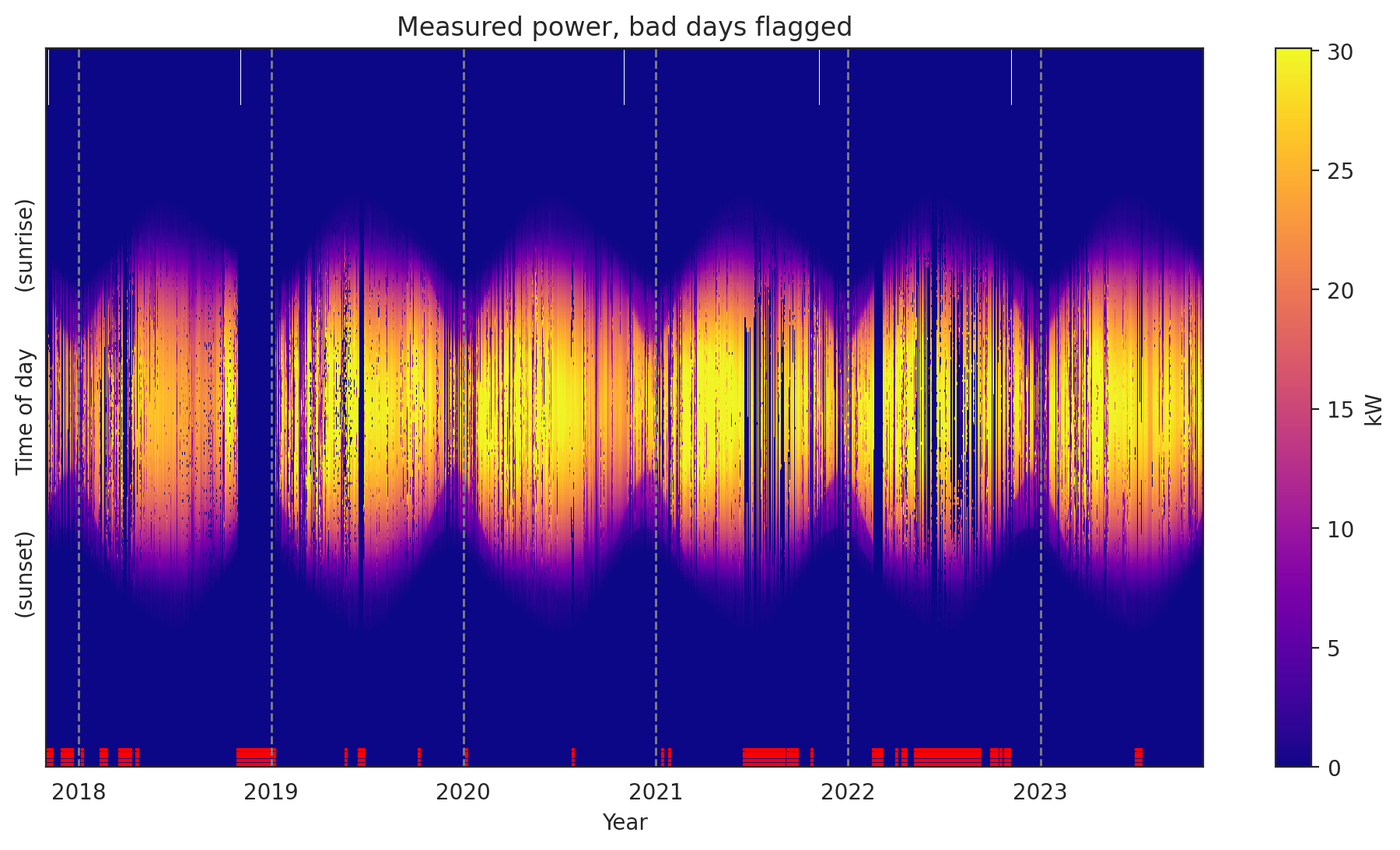
Each of the subroutines in the onboarding pipeline have plotting functions associated with them, so provide insight into how the algorithm performed. For example, we saw in the report that there were “capacity changes”. We can inspect this analysis.
[10]:
dh_2107.plot_capacity_change_analysis();
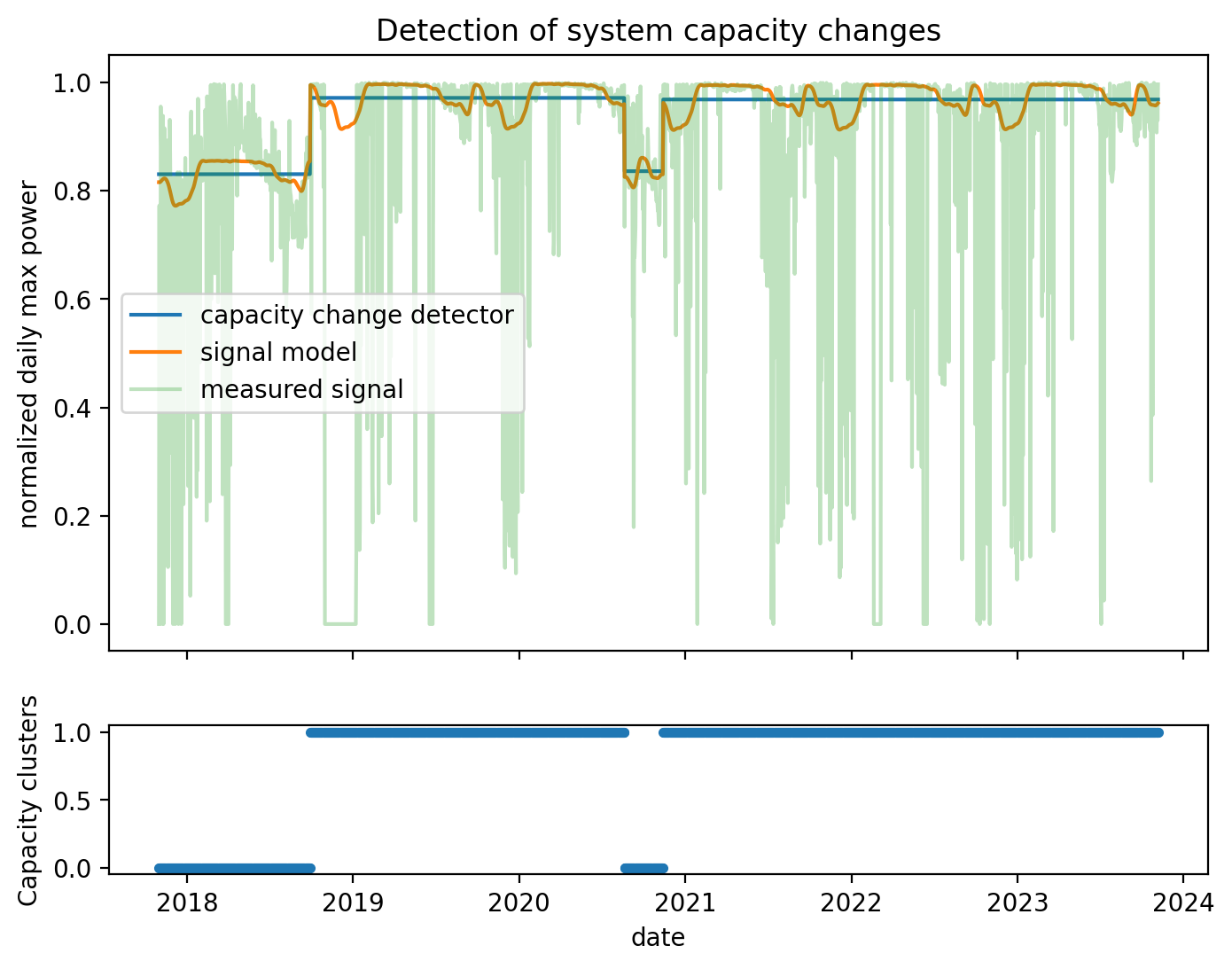
Here is a “polar transform” view of the measured power. We bin times of the year and transform them into azimuth-angle location and average the measured power in each bin. Some bins near the top have no observations at this scale.
[11]:
dh_2107.plot_polar_transform(lat=38.996306, lon=-122.134111, tz_offset=-8);
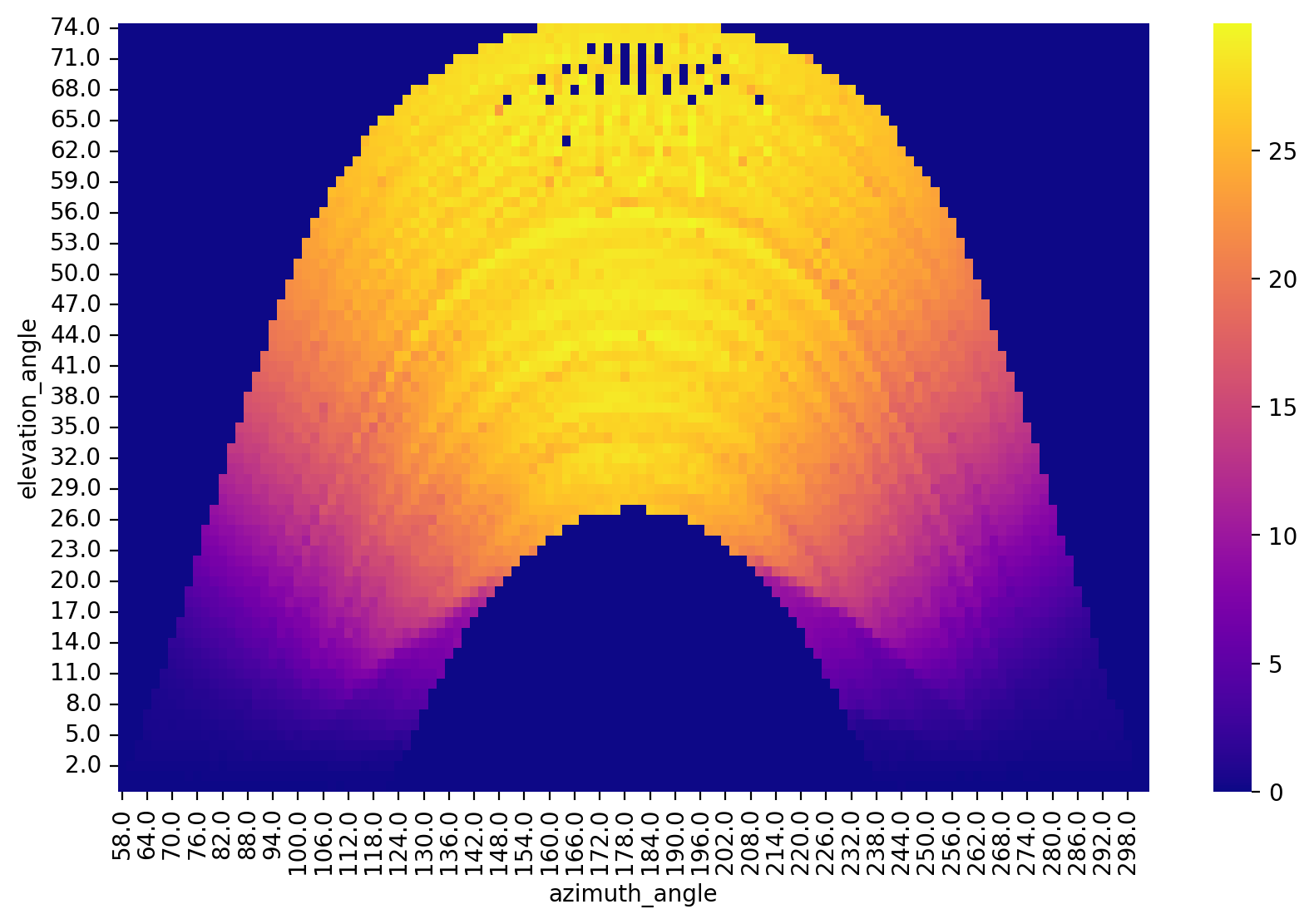
When objects are causing shade, they are identifiable in this view. For example, the irradiance sensor is shaded by a pole.
[12]:
df_2107_irr = load_data(
filename="inputs/2107_irradiance_data.csv",
s3_bucket="oedi-data-lake",
s3_key="pvdaq/2023-solar-data-prize/2107_OEDI/data/2107_irradiance_data.csv",
)
dh_2107_irr = DataHandler(df_2107_irr)
dh_2107_irr.fix_dst()
dh_2107_irr.run_pipeline(solver="QSS", verbose=False)
dh_2107_irr.plot_polar_transform(lat=38.996306, lon=-122.134111, tz_offset=-8);
Loading local CSV file: inputs/2107_irradiance_data.csv
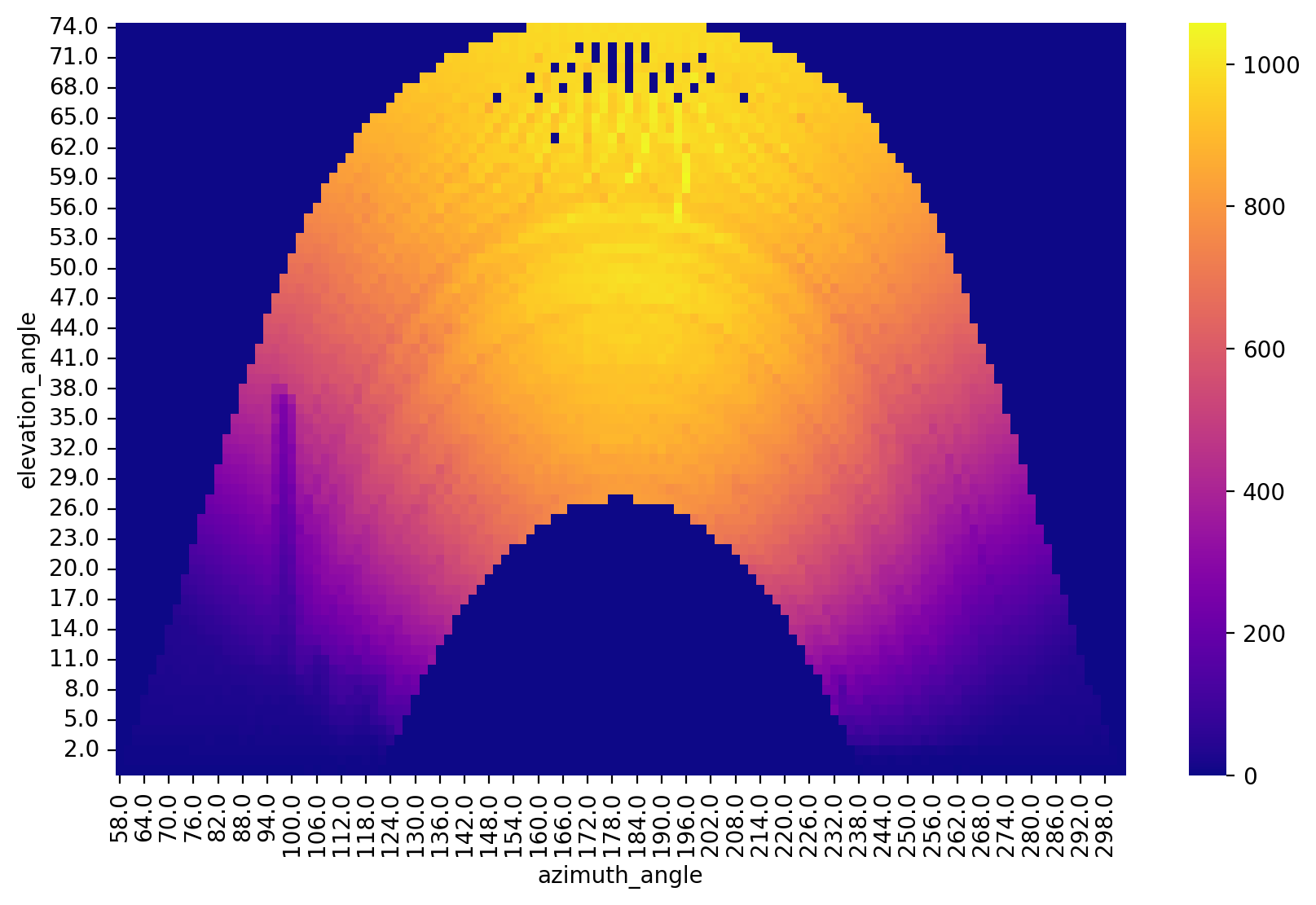
In this case, we happen to know the latitude and longitude. But what if you need that information?
[13]:
# just provide a GMT offset for the timestamps
dh_2107.setup_location_and_orientation_estimation(-8)
lat_est = dh_2107.estimate_latitude()
lon_est = dh_2107.estimate_longitude()
result = f"""
Actual Estimated
Lat: {38.996306:>6.1f} {lat_est:>6.1f}
Lon: {-122.134111:>6.1f} {lon_est:>6.1f}
"""
print(result)
Actual Estimated
Lat: 39.0 40.0
Lon: -122.1 -122.2
(roughly 72 miles from the actual location)
And estimate the location in addition to orientation (tilt and azimuth). Here we don’t know the actual location of the system to compare to, but we can demo the methods as follows:
[14]:
lat_est, long_est, tilt_est, az_est = dh_2107.estimate_location_and_orientation()
result = f"""
Actual Estimated
Lat: {38.996306:>6.1f} {lat_est:>6.1f}
Lon: {-122.134111:>6.1f} {lon_est:>6.1f}
Tilt: - {tilt_est:>6.1f}
Az: - {az_est:>6.1f}
"""
print(result)
Actual Estimated
Lat: 39.0 40.0
Lon: -122.1 -122.2
Tilt: - 28.1
Az: - -3.7
We can also estimate orientation of the system with one method (instead of one for lat and one for long):
[15]:
tilt_est, az_est = dh_2107.estimate_orientation()
print(f"Tilt: {tilt_est:>6.1f}, Az: {az_est:>6.1f}")
Tilt: 28.1, Az: -3.7
Loss factor analysis#
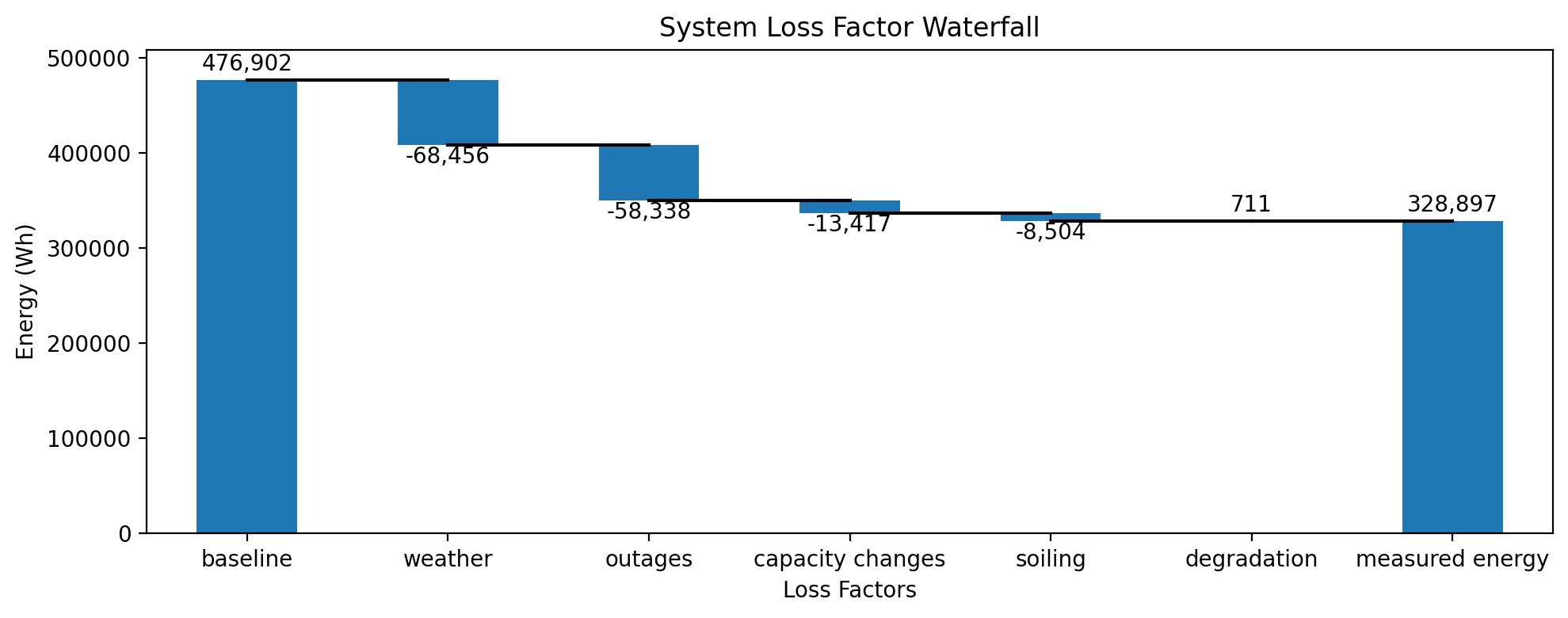
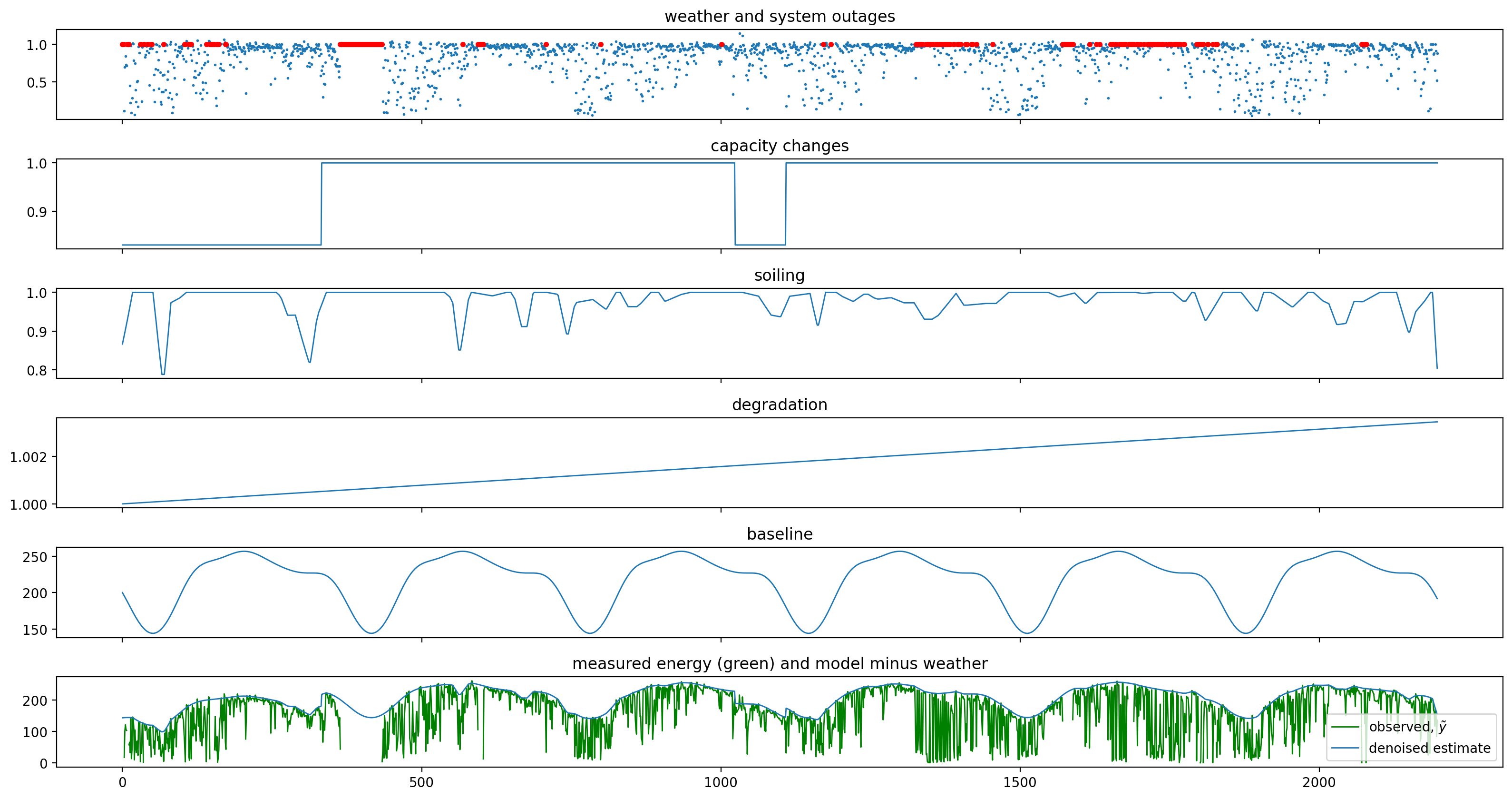
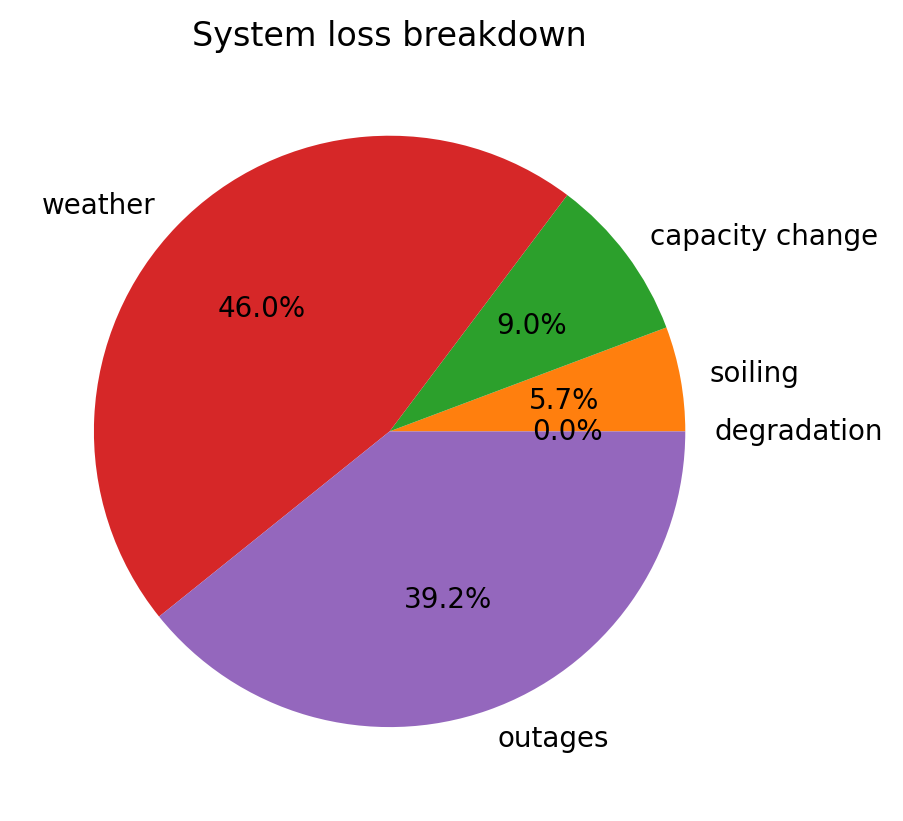
After running the main pipeline, we can now run other analysis, such as estimating the long-term, bulk degradation rate and the total losses from weather, outages, capacity changes, and soiling. As with the data quality analytics in the pipeline, this method relies on a technique of statistical signal decomposition. We fit many similar signal decomposition models with Monte Carlo sampling on the parameters to generate a stable estimate of the degradation rate with confidence bounds.
[16]:
dh_2107.run_loss_factor_analysis()
************************************************
* Solar Data Tools Degradation Estimation Tool *
************************************************
Monte Carlo sampling to generate a distributional estimate
of the degradation rate [%/yr]
The distribution typically stabilizes in 50-100 samples.
Author: Bennet Meyers, SLAC
This material is based upon work supported by the U.S. Department
of Energy's Office of Energy Efficiency and Renewable Energy (EERE)
under the Solar Energy Technologies Office Award Number 38529.
10it [01:09, 7.37s/it]
P50, P02.5, P97.5: 0.047, -0.135, 0.144
changes: -3.850e-03, 0.000e+00, 0.000e+00
20it [02:26, 7.50s/it]
P50, P02.5, P97.5: 0.055, -0.135, 0.244
changes: -2.341e-03, 0.000e+00, 0.000e+00
22it [02:49, 7.69s/it]
Performing loss factor analysis...
***************************************
* Solar Data Tools Loss Factor Report *
***************************************
degradation rate [%/yr]: 0.058
deg. rate 95% confidence: [-0.135, 0.244]
total energy loss [kWh]: -148004.3
bulk deg. energy loss (gain) [kWh]: 711.4
soiling energy loss [kWh]: -8504.0
capacity change energy loss [kWh]: -13417.2
weather energy loss [kWh]: -68456.3
system outage loss [kWh]: -58338.3
[17]:
dh_2107.loss_analysis.plot_waterfall();
[18]:
dh_2107.loss_analysis.plot_decomposition();
[19]:
with plt.rc_context():
dh_2107.loss_analysis.plot_pie()
Analysis of site 2015 “Maui Ocean Center”#
One feature of SDT is the speed with which a new analysis can be set up. Typically, all you need to start analyzing data from a new site is the ability to load power data into a data frame. This is even true for sites like 2105, which have complex and difficult to model roof configurations.
